


Wordstock for Monarch
Wordstock is a free braille word-guessing game designed exclusively for Monarch that turns traditional spelling practice into a fun interactive challenge.
Federal Quota Eligible
Catalog Number: D-31000-AP
Product Description
Designed exclusively for Monarch, Wordstock is a braille word-guessing game created to strengthen spelling, vocabulary, and critical thinking skills. Each guess challenges learners to think critically about letter placement, recognize patterns, and refine their strategy based on structured feedback.
With immediate tactile input that clearly indicates which letters are correct or incorrect, students strengthen phonics skills, deepen their understanding of word structure, and build confidence in their problem-solving abilities. The built-in 4-letter and 5-letter modes allow educators to differentiate instruction and support learners at varying skill levels.
Ideal for daily literacy warm-ups, small group instruction, or independent practice, Wordstock transforms traditional spelling practice into an interactive challenge, helping students develop the fluency and confidence they need to become stronger, more confident braille readers.
To download Wordstock on your Monarch, please follow these instructions:
Wordstock is an optional application that can be installed onto your Monarch. Monarch Firmware 1.4 or later is required. To ensure you have the most current version:
- Connect your Monarch to the internet.
- Launch the KeyUpdater application found in “All Applications”.
- Follow the on-screen prompts to download and install the latest software.
Once you are running Firmware 1.4 or later, you may install Wordstock by following these steps:
- Make sure your Monarch is connected to the internet and run the KeyUpdater application found in “All Applications.”
- Select the “Install Other Applications” option, and press enter.
- In the list of applications, select “Wordstock,” and press enter.
- Select “Download Wordstock,” and press enter.
- Wordstock will download to your Monarch. When the download is complete, press enter to dismiss the confirmation message that appears.
-
- Multiple Puzzle Lengths – Supports both 4-letter and 5-letter word puzzles to vary difficulty and practice. Teachers and learners can select puzzle length based on skill level.
- Accessible Tactile Interaction – Designed for the Monarch dynamic tactile display. Real-time tactile feedback for letter positions and pattern discovery.
- Immediate Response System – Feedback indicates correct letters in correct positions, correct letters in wrong positions, and letters not in the target word.
- Vocabulary Reinforcement – Encourages phonics practice, spelling accuracy, and word structure awareness.
- Daily Challenge Mode – Presents a new puzzle each day to build routine engagement and consistency.
- Practice & Replay Options – Unlimited practice puzzles beyond daily challenges to reinforce learning.
- Progress Tracking – Learner feedback on puzzles attempted, success rates, and improvement over time.
-
- “Three of us were very competitive to see who could solve it first.”
- “It is wonderful to have a word game…”
- “This student loves his Monarch. He uses it daily.”
- “I love this! Can I have this on my Monarch when it comes out?”
- “[My student] enjoyed playing this game and often asked to play again.”
-
Federal Quota Funds: Available
-
Contact Customer Service to discuss your warranty options.
Other Products
Word PlayHouse
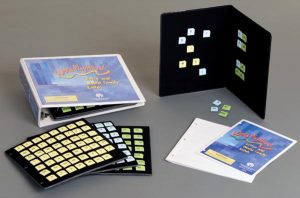
Manipulate Braille/print tiles on a felt board to make words and teach phonics and reading skills.
Catalog Number: 1-03562-00
Federal Quota Eligible
product
This product is discontinued.
Wilson Reading System III, Student Reader Two, Braille Kit (UEB)

The Wilson Reading System® (WRS) is a research-based reading and writing program. Note: This product has been discontinued. An accessible…
Catalog Number: 6-79511-SK2
Federal Quota Eligible
product
Word PlayHouse: Vowel Cards with Storage Panel
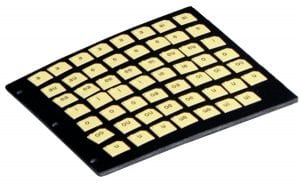
Replacement item for Word PlayHouse Kit: 1-03562-00.
$64.80
Catalog Number: 61-370-002
Replacement Item
Federal Quota Eligible
4 in stock
product