TactileView is an intuitive tactile graphic editor that enables users of all abilities to create and share high-quality tactile graphics, now with seamless integration with Monarch.
TactileView is an intuitive tactile graphic editor designed to make visual information accessible for individuals who are blind or have low vision. It allows users to create, share, and download tactile drawings from an extensive online library with options for braille, black script, or audio labels. TactileView can also be integrated with DuxburyDBT to emboss graphics and text with a single file. Whether you are importing tactile maps or generating mathematical graphs, users can create precise tactile content with ease.
With TactileView 3.0, the drawing software has a new look and is now fully optimized for tactile graphics on Monarch, offering seamless compatibility, enhanced precision, and a smoother workflow for creating digital tactile content like never before. Designed with accessibility at its core, TactileView is an intuitive design tool built to support users of all abilities in the creation of tactile graphics.
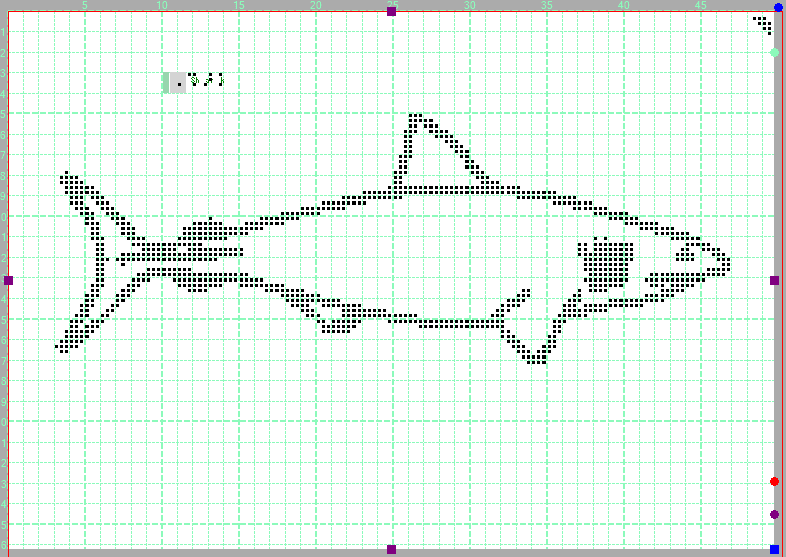
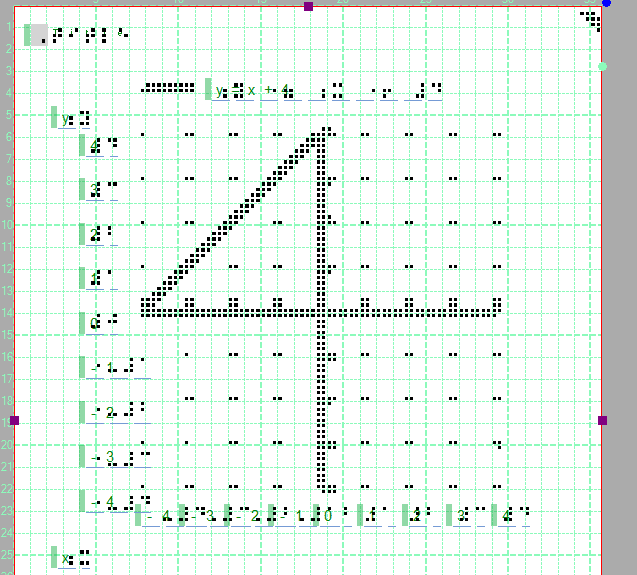
While tactile graphic guidelines have long existed, there has been no clear method for creating tactile content specifically designed for devices that combine braille and tactile graphics, like Monarch. While embossed and thermal paper have long been the standard, the future is digital. That’s where Monarch Mode in TactileView 3 comes in. With this new feature, you can now create fully optimized tactile graphics tailored for Monarch; choose between a multi-page tactile graphic or one large Tactile graphic without paper boundaries; preview your designs with Braille Dot View to see exactly how graphics will appear on the device, no Monarch needed; easily integrate your tactile designs with braille text, and add to Duxbury, ready for next-gen digital delivery of ebraille; and print to PDF (For Monarch) to create a PDF file so it can be opened on Monarch.
Ink over braille
A new enhancement that brings together print and braille on the same page. Available for embossers that can cater for printable paper, such as the Index Everest. Ink over braille refers to the practice of printing visual (ink) text or graphics directly above or alongside braille on the same document. This technique allows the same material to be read by both sighted users and braille readers, making it ideal for inclusive communication and education. This allows dual readability for sighted individuals and braille users as well as efficient communication in mixed-ability settings. This new and exciting enhancement works with Embosser that can cater for printable size page format.
The Undo feature
The Undo feature was one of the most requested additions from TactileView users. It may sound underrated, but when you're in creative mode, it's easy to make quick changes that don’t quite work out. Now, with the press of a single Undo button, you can instantly step back—removing recent actions one by one and refining your tactile graphic without the stress.
Q: What is Tactile View?
A: Tactile View is a tactile creation suite that allows you to create simple and powerful tactile graphics.
Q: Can you use Tactile View with a screen reader?
A: Yes, Tactile View is the only accessible tactile graphic suite that allows the visually impaired to create tactile graphics using menu-driven options.
Q: What embossers does tactile View support?
A: Any mainstream embossers are supported including Enabling, Index and Viewplus embossers.
Q: Why is Tactile View the best Tactile Graphic suite?
A: TactileView can create high-quality tactile graphics and braille labels. You can make anything from simple to more complex tactile graphics. Most importantly, it’s software dedicated to creating tactile graphics, not like a word processor. It has several key tools to filter images and make them come alive in tactile form. With it’s large catalogue of tactile Graphics, opening existing tactile graphics allows you to make changes to existing already made tactile graphics, saving precious time. TactileView is the ONLY tactile creator that is accessible.
Q: Is Maths supported in TactileView?
A: Yes. TactileView supports MathML content and can be translated into the following Braille math tables:
· Nemeth
· UEB
· UKmath
· Marbug
· Dedicon (NL)
· Latex
Q: Are you able to create graphs?
A: Yes, creating graphs is a relatively simple process and will save you a lot of time. To create a graph by inputting a formula, select “Add custom graph:Keyboard input from the Graphs menu item.
Q: Does Tactile View work with Duxbury?
Yes, with a valid license on both Duxbury and Tactile View, you are able to add a tactile graphic in Duxbury. To add a picture in Duxbury, you must already have a saved tactile graphic. Open Duxbury, and select Layout and then add Picture.
Q: Sometimes, I see a tactile graphic, and I notice that there are different line colours.
A: Objects such as circles and squares are known as objects; these will be identifiable by a blue outline. If at any point there are drawings or images, these will be outlined in black. Objects are clickable and can be dragged around the page, whereas drawings or image outlines have to be selected in order to move them.
Q: Can you convert objects into line drawings?
A: Yes, an option called fused will be available upon selecting the object. The selected object will be converted to a line drawing when selecting this item. Please note that once applied, it will not have the same capabilities as before.
Q: Why would you want to convert objects to line drawings?
A: It gives you more options, including using the eraser.
Q: Does Tactile View have a tactile graphics repository?
A: One of TactileView’s benefits is its large repository of tactile graphics, which allows users to share content. The TactileView catalogue has over 4k available tactile graphics that can be used and customized to your needs.
Q: Can you create tactile Maps?
A: Yes, HumanWare owns Route Tactile, which operates independently from TactileView. However, to create a map, you can simply select “Portal” and choose “Compose Map.” This will direct you to a webpage where you can begin creating your tactile map.
Q: I have just purchased TactileView, where do I start?
A: To start Tactileview, HumanWare has several resources that can be used in video or text form. Visit the HumanWare support page, where several videos will help you get started.
Q: Are any guides available on the HW buddy application?
A: Not yet, but this is something we will start to add.
Q: I Have a Monarch, can I create Tactile graphics for it?
A: Yes, as of version 3, TactileView has introduced Monarch Mode. When enabled it will allow you to create optimized tactile graphics for Monarch. You will have the option to use a set page size and have multiple pages, or have 1 large page with no page border restrictions.
A really useful option is to use the Monarch page size, and together with the dot view, which will help you understand how the Tactile Graphic will appear when zoomed in.
Q: What is Braille over Ink?
Braille after ink enables the combination of printed text and Braille on the same page, available on embossers that support printable paper formats—such as the Index Everest. This makes a single document accessible to both braille readers and sighted individuals, fostering inclusivity in communication and education.
Note: If the Braille after ink icon is not visible, make sure to deactivate Monarch mode.
Q: I have an older version, is there an upgrade path?
A: Yes, to upgrade to the latest version of TactileView, contact our sales team who would be happy to help.
Q: Is there an option to purchase a network license for TactileView?
A: No, TactileView is only available to purchase on a single license basis.
Q: I have little knowledge of Braille and have been given the task to create tactile graphics for students, is there a help sheet to understand how to type words in Braille?
A: One of the major advantages of TactileView is its built-in automatic braille translation. Even if you don’t know Braille, that’s no problem—just create text labels using your keyboard, and TactileView will handle the Braille translation for you. You will however need to know what braille table to use and select this table from the braille table option.
Q: Do you need to have Mathtype in order to create mathematical equations and graphs.
A: No. Although MathType works with TactileView, you can also copy math equations from other MathML programs, such as Microsoft Word.
Q: When creating text labels, I notice the text appears in green. Will this be printed? A: No. The green text will not be printed or embossed. It is intended for sighted users so they can see what has been typed. If you want the letters themselves to be printed, there is an option to add font text.